What’s new

What changed, told for people.

Every version of Vellum in a few lines: what is new, what got better and what I fixed.

How to update

Written from the technical record: CHANGELOG.md on GitHub (opens in a new tab)

Series 1.x
Oct 8, 2026 – Oct 10, 2026

Vellum 1.x2 versions

The stable version. Vellum leaves its early days behind: it arrives in the Microsoft Store, and the road from the game to your map is complete.

1.0.0

includes 1.0.1

Link to this version 1.0.0

Vellum, version 1.0

Vellum is no longer an early version. It arrives in the Microsoft Store, and Vellum Bridge gets its own options panel and tells you where it left your city. Thanks to everyone who tried the 0.x versions and said what was missing.
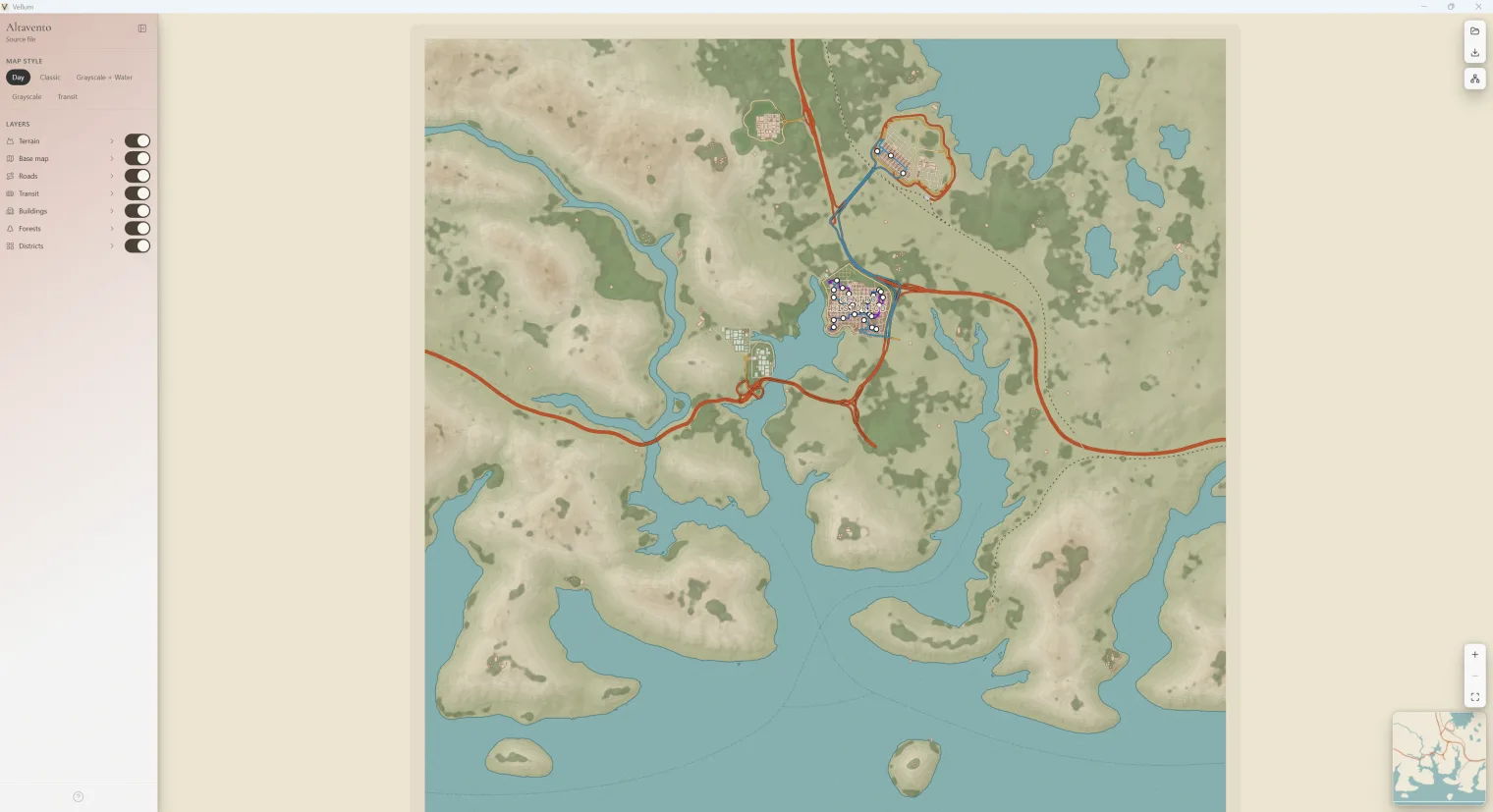
Vellum with Altavento open in Day: every layer on and the sidebar with the layer list and the map style

New

  • Vellum in the Microsoft Store. Install it from the Store: it comes signed, without the SmartScreen warning, and updates itself.
  • Vellum Bridge has its own options panel, in English and Spanish.
  • Bridge tells you where it saved your city when the export is done.

Improved

  • The welcome screen is simpler, and its buttons show that they heard your click.

Fixed

  • Maps opened from a Bridge export keep their real file name in the marginalia.
  • Heating pipes from Snowfall no longer draw as streets across the whole map.

Technical details · v1.0.0 (opens in a new tab)How to update

Series 0.x
Aug 8, 2026 – Oct 4, 2026

Vellum 0.x26 versions

Two months building in public. It started as a viewer for the .cslmap files of the old CSL Map View and ended with its own mod in the game, Vellum Bridge, a schematic view of transit, real map marginalia and five themes.

Thanks to everyone on r/CitiesSkylines who tried these versions and said what was missing.

Vellum 0.xShow its 13 entries

0.14.0

Link to this version 0.14.0

A clearer Day and an ink coastline

The Day theme is reordered so roads read by importance at a glance, and the coast gets an ink line of its own.

New

  • Day with a road hierarchy. Motorways, avenues and streets stand apart better, and the city takes on a clay-pink tone.
  • Ink shoreline: the coast is drawn in its own colour, derived from the water of the theme.
  • A new Windows icon in the Fluent style of the system, in the taskbar too.

Improved

  • Roads in tunnels look continuous and dimmed instead of cut off.
  • The built-in themes always appear in the same order, on every system.
  • The geographic map no longer shows transfer markers, which cluttered it.

Fixed

  • Inland water and the coast no longer drift apart: they come from the same geometry.
  • The minimap and the pan limit frame the whole world.
  • The About window names the game, and its Close button no longer vanishes on hover.

Technical details · v0.14.0 (opens in a new tab)How to update

0.13.0

includes 0.13.1 and 0.13.2

Link to this version 0.13.0

Forests your way and a tidier schematic

A big release for transit: the schematic view is reorganised station by station, and forests gain two new ways to look.

New

  • Forests as vegetation circles or as a heat map, besides the tree crowns.
  • Roads by category: show or hide rail, air and water routes separately.
  • Surface trains appear on the minimap.
  • Parklife tours are recognised as transit modes of their own.
  • Bridge names the stops of stations with a building and saves each city in its own folder, stamped with your local time.

Improved

  • In the schematic view, each station is a single node and rails take priority.
  • Schematic lines follow a cleaner grid and turn at stations.
  • The schematic camera moves like the one of the map, and smoothly.

Fixed

  • The stop card opens on the left and no longer covers the camera controls.
  • At close zoom, stations are the same size as their lines.
  • 0.13.1 · On Linux, the window groups with its icon in the panel.
  • 0.13.2 · Parks keep their real type from the game; the place card shows a single list of specialisations and a title for districts without a name; the cable car comes back with the roads layer.

Technical details · v0.13.0 (opens in a new tab)How to update

0.11.0

includes 0.11.1

Link to this version 0.11.0

Your city from the game, with its street names

Vellum opens the cities that Vellum Bridge exports from the game, and with them come street names, a place card and districts coloured by what they do.

New

  • Open a city exported with Vellum Bridge (.vellummap) right in Vellum.
  • Street names and the real width of each road at detail zoom.
  • A place card: select a district, a park or a building to see what it is.
  • Districts coloured by specialisation, named by default, with an optional marker.
  • Forests as tree crowns instead of one circle per cell.
  • A keyboard shortcuts sheet, opened with ?.
  • Precise zoom from the camera controls, and the map settles back on the city when you pull out past it.
  • Shift + Click on a layer of the rail opens its options.

Improved

  • In the schematic view, stop names run across the line and keep clear of each other.
  • The loading screen stays until the map is really drawn.
  • Cities open faster: the file is read and the terrain is built in parallel.
  • The forest green of Day is easier to read.

Fixed

  • Water is classified by its depth, not against the sea level.
  • At junctions, the minor street ends under the major road.
  • The SVG export follows the real width of the roads, like the map.
  • Shift + 1…7 opens the layer options from any row of the keyboard.
  • The welcome screen no longer promises a future exporter.
  • 0.11.1 · Tree crowns keep loading after panning at detail zoom, and going back to the whole city is one smooth move.

Technical details · v0.11.0 (opens in a new tab)How to update

0.10.0

Link to this version 0.10.0

The schematic view arrives

Your transit network as a metro diagram, in a view of its own next to the geographic map.

New

  • A schematic view, separate from the map, drawn with the rules of LOOM by Bast and Brosi.
  • Octilinear and orthoradial layouts to compare the same network two ways.
  • Read and control the network: highlight a line and find every line in order in the sidebar.
  • Line labels, an orthoradial grid and a manual relayout.
  • Semantic zoom that groups nearby stations as you pull out.

Technical details · v0.10.0 (opens in a new tab)How to update

0.9.0

Link to this version 0.9.0

Map marginalia and a public theme format

Exports gain real map marginalia, the .vellumstyle format becomes public, and Windows gets a recommended installer.

New

  • Marginalia in PNG and SVG exports: the city name, legends, scale and north, like on a printed map.
  • The .vellumstyle format is public, with its JSON schema, and your themes stay compatible as Vellum evolves.
  • Transfers between transit modes are drawn on the map once they are confirmed.
  • On Windows, the .exe installer becomes the recommended one, with a splash screen while it installs.

Fixed

  • The export captures the whole base composition, and the PNG waits until everything is drawn.
  • Native radio buttons and checkboxes follow the dark theme.
  • Silent installs on Windows skip the language dialog.
  • The map engine moves to MapLibre 6, with its security fixes.

Technical details · v0.9.0 (opens in a new tab)How to update

0.7.0

Link to this version 0.7.0

A safer, more private desktop app

Vellum locks down its desktop app and gives a few unusual roads a style of their own.

New

  • A desktop app locked down for security and privacy, with guarded contracts between the map and the app.
  • Pedestrian streets get their own style, and helicopter routes no longer show up as roads.
  • The cable car gets its own treatment.
  • The sidebar gradient follows the active theme.

Fixed

  • Dashed lines come out at the right size in exports.
  • Roads are classified with the right vocabulary from the game.
  • Colour mixes and opacity of the themes in the style of Mica are adjusted.

Technical details · v0.7.0 (opens in a new tab)How to update

0.6.0

Link to this version 0.6.0

A window in the style of each system

Vellum dresses its window in the style of each system: Mica on Windows, Liquid Glass on macOS.

New

  • Window materials in the style of Mica and Liquid Glass, with a sidebar in the style of Liquid Glass on macOS.
  • The sidebar adapts to the window and you can resize it.
  • A dark theme for the app chrome.
  • The native menu is reorganised into submenus and follows your language.
  • Pending updates install from a command of the app.

Technical details · v0.6.0 (opens in a new tab)How to update

0.4.0

includes 0.4.1

Link to this version 0.4.0

Themes, two languages and .cslmap on Windows

Vellum learns Spanish, lets you pick a theme and opens your .cslmap with a double click on Windows.

New

  • A theme selector.
  • The interface in English and Spanish.
  • On Windows, .cslmap files open in Vellum.
  • Export notices close by themselves or with a click.
  • A new logo and refreshed Day colours.

Improved

  • Big cities draw faster: the heaviest map sources are capped and the map uses more workers.

Fixed

  • Buildings of the DLCs get their real service type.
  • A layer that fails no longer stops the rest of the map from drawing.
  • 0.4.1 · Blimp routes get their style back, and airplanes are recognised too.

Technical details · v0.4.0 (opens in a new tab)How to update

0.2.0

includes 0.2.1, 0.2.2, 0.2.3, 0.2.4, 0.2.5, 0.2.6, 0.2.7 and 0.2.8

Link to this version 0.2.0

The first public version

The first public versions of Vellum: open the .cslmap of CSL Map View and see your city as a map.

New

  • Open .cslmap files exported with CSL Map View.
  • Layers: terrain with elevation colours and relief, roads, buildings, forests, districts, parks and transit with each of its modes.
  • Turn layers on and off with 1…7 and open their options with Shift + 1…7.
  • Export to PNG and SVG.
  • Five built-in themes, and your own themes as .vellumstyle files.
  • Rotation, clean mode and a minimap.

Fixed

  • 0.2.1–0.2.8 · Releases and the update manifest are published more reliably, so updates find the right files.

Technical details · v0.2.0 (opens in a new tab)How to update